
Image to LaTeX Converter
Paste a screenshot or picture of a formula and get LaTeX you can copy into Overleaf, Markdown or Word, with a live preview to fix any symbol.
- 3 free a day, no sign-up
- Printed and handwritten math
- Editable Word equations
Paste a formula screenshot with Ctrl+V
or drop an image here · PNG, JPG, WebP · large images are resized for you
Sample result
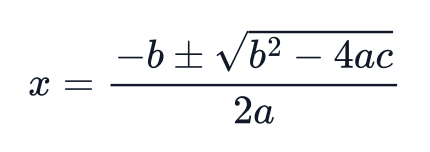 became
x = \frac{-b \pm \sqrt{b^2 - 4ac}}{2a}From picture to LaTeX
Real results from this converter: each image on the left was turned into the LaTeX on the right.
x = \frac{-b \pm \sqrt{b^2 - 4ac}}{2a}Quadratic formula
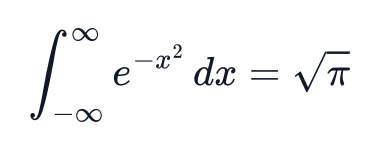
\int_{-\infty}^{\infty} e^{-x^2} dx = \sqrt{\pi}Gaussian integral
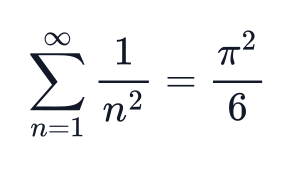
\sum_{n=1}^{\infty} \frac{1}{n^2} = \frac{\pi^2}{6}Series
How to convert an image to LaTeX
Step 1: Add the formula image
Paste a screenshot with Ctrl+V, drop a file, or choose one. Photos of handwriting work too.
Step 2: Convert and check
Press Convert to LaTeX. The code and a rendered preview appear side by side; edit the code if a symbol is off.
Step 3: Copy or export
Copy the LaTeX, copy it as a Word equation, or download .docx, PNG or SVG.
More ways to convert math
- Handwritten math to LaTeXPhotograph notes or a whiteboard derivation.
- PDF to LaTeXTurn a whole paper into a .tex project for Overleaf.
- Image to WordGet a document whose equations stay editable in Word.
- LaTeX to WordMove formulas you already have into a Word file.
- LaTeX equation editorWrite LaTeX with a live preview and export it.
Made for formulas you will keep editing
What happens after the conversion matters as much as the conversion.
Word equations, not pictures
Copy for Word and .docx downloads give native Word equations you can keep editing.
Fix it before you copy
The image, the code and the rendered formula sit together, so a wrong subscript is easy to spot and fix.
A second engine for hard cases
Handwriting and doubtful results can be re-run with a high-accuracy recognition engine.
Images are not kept
Your image is read and discarded; only the LaTeX result is saved.
Plans for PDFs, handwriting and lots of formulas
Single formulas are free to try. Credits pay for handwriting, high-accuracy runs and document conversion.
Image to LaTeX questions
- Is the image to LaTeX converter free?
- Yes. Without an account you can convert 3 formula images a day (20 a month). A free account raises that to 6 a day and 50 a month and adds Word downloads. Copying LaTeX, the preview and the editor are always free.
- How do I convert an image to LaTeX?
- Take a screenshot of the formula, click the converter and press Ctrl+V (or drop or choose the image), then press Convert to LaTeX. Check the preview, fix any symbol in the code box, and copy the LaTeX.
- Can I paste the result into Microsoft Word?
- Yes. Copy for Word puts the formula on the clipboard as MathML, which Word turns into an equation you can edit. You can also download a .docx file whose equations open in Word’s equation editor.
- Does it read handwritten formulas?
- Yes. Tick Handwritten before converting. Handwriting goes to our high-accuracy engine, which needs a free account and uses 1 credit per image.
- What if a symbol comes out wrong?
- Edit the LaTeX in the code box; the preview redraws as you type. If the whole result is off, re-run the image with the high-accuracy engine (1 credit, account needed).
- Do you keep my images?
- No. The image is sent to the recognition service, read, and discarded. We keep the LaTeX result and a fingerprint of the image (not the image itself) so free limits and your history work.
- Which image formats work?
- PNG, JPG, WebP and GIF. Large images are shrunk in your browser to 1600 pixels on the long side before upload, which is plenty for a formula.